Skip to content
Bifröst OrbitBooking Orbit
Sign in

Booking Orbit

Every booking, connected. From the first click to the review.

Booking Orbit takes appointments with your people, rooms and classes at every location.

Customers book online in their own language, pay a deposit through your own Stripe account and get reminders that cut no-shows. Your team sees the whole day on one screen.

See plans

Who it's for

For anyone whose day is made of appointments

An appointment is a time with a person, a room or both, from a quarter of an hour to a few hours. Booking Orbit is built around that.

Shops with a service desk

Fittings, repairs and workshop slots, booked alongside what you sell.

Instructors and classes

Private lessons and group sessions with a set number of places.

Advice by video

Online services with a meeting link in the confirmation and every reminder.

Teams across locations

Each location with its own people, hours, booking page and Stripe account.

The difference

Less time on the phone. Fewer empty chairs.

Most teams take appointments by phone, email and a shared calendar. Here is what changes.

  • Finding a time

    Today

    Phone calls and emails back and forth until a time suits both sides.

    With Booking Orbit

    Customers pick a free time themselves, day or night, in their own language and time zone.

  • No-shows

    Today

    A missed appointment is noticed when the chair is already empty.

    With Booking Orbit

    Each upcoming appointment has a no-show risk with the reasons, and an extra reminder is one click away.

  • Cancellations

    Today

    A cancelled slot stays empty, because nobody knows who wanted it.

    With Booking Orbit

    The time is held for the first person on the waitlist, who gets an email to book it.

  • Deposits

    Today

    Card details on paper, or no deposit at all.

    With Booking Orbit

    Deposits, prepayment or a saved card for late cancellations, paid into your own Stripe account.

  • Double bookings

    Today

    Two customers for one fitting room, or one person in two places.

    With Booking Orbit

    A time is only offered when the person and every room or piece of equipment it needs are free.

The booking page

Four short steps, on any phone

Every location has its own booking page. Customers choose a service, a person or Anyone available, a time and then their details. No account is needed, and the time is held for them while they finish.

Booking OrbitBooking page
  • Their language and time zone: The page speaks every language the location writes in, and works with a keyboard and screen reader throughout.
  • Ask in plain words: Customers can type 'a climbing lesson on Saturday' and choose from the free times it finds.
  • Questions before the visit: Forms ask for a shoe size or climbing experience, with consent that keeps its exact wording.
  • Change or cancel online: The confirmation has a link, so a time someone can't use goes back on offer.

How it works

From a free time to a done appointment

  1. 01

    Set up a location

    Add its opening hours, the people who take appointments and the services they offer, with length, price and any room they need.

  2. 02

    Share the booking page

    Send the link, print the QR code, add the widget to your website, or use the components of a website built with CMS Orbit.

  3. 03

    Customers book and pay

    They pick a time, answer your questions and pay a deposit if you ask for one. The confirmation and reminders go out on their own.

  4. 04

    Your team runs the day

    Check customers in, mark appointments done or as a no-show, and let Presence Orbit ask for a review afterwards.

Today

The whole location on one screen

Today is the first screen of every location. It says how the day looks in a sentence, lists the appointments by person with the one happening now highlighted, and gathers what needs someone: bookings to confirm, appointments not yet marked and people on the waitlist.

Above it, the numbers that matter: today, the next seven days, utilisation, no-shows and revenue over 30 days, each against the 30 days before. Busy hours shows when appointments start, so you can plan who works when.

Booking OrbitToday

Built in

Made to keep the diary full

No-show risk you can read

Each upcoming appointment gets a score from 0 to 100, from published reasons such as a first visit, earlier no-shows or nothing paid in advance. There is no hidden model, and no customer data leaves Booking Orbit for it.

A waitlist that books itself

When a time frees up, it's held for two hours for the first person waiting, who gets an email to book it.

Reminders that arrive

Up to four reminders per appointment, with quiet hours. Email on every plan, text messages and WhatsApp on Growth through your own Twilio account.

Deposits through your Stripe

A deposit, the full price or a saved card for no-show fees, with refunds worked out from your cancellation rules. Bifröst Orbit takes no cut.

Packages of sessions

Sell five climbing lessons at once. Each booking uses one, and a session cancelled in time goes back.

Rooms, equipment and classes

On Growth, services that need a fitting room or a workshop bench, and group sessions with places left.

Calendar and reports

Move anything. See how the month went.

See the day by person, side by side, by week or by room. Click an empty time to book for a customer who called, drag an appointment to move it to another time or person, and drag its edge to make it longer. If the new time isn't free, Booking Orbit says why.

Booking OrbitReports
  • A history on every appointment: Who booked, moved, confirmed or cancelled it, with notes for the team only.
  • One record per customer: Visits, no-shows, notes and tags together, with duplicates merged and data exported or erased on request.
  • Reports: Utilisation, revenue by service and person, no-shows and rebooking, with a CSV download.

Connecting Google and Microsoft 365 calendars, with Meet, Teams and Zoom links, is built and switches on once Bifröst Orbit's connections with Google, Microsoft and Zoom are approved.

At Northwilds

One location, four kinds of appointment

Northwilds, our demo outdoor brand, runs its Oslo shop on Booking Orbit.

Northwilds Oslo, boot fitting

A fitting with the right fitter

Boot fittings take 45 minutes with Ingrid or Erik, with 15 minutes after to tidy up. The booking form asks for a shoe size, so the right boots are waiting.

  1. Customer books Anyone available
  2. Form asks for the shoe size
  3. Reminder the day before
  4. Marked done, then asked for a review

Fewer wasted fittings, and a review request after every visit.
Northwilds Oslo, workshop

Ski service paid up front

Lars services skis in the workshop behind the shop. The service is paid in full when booked, so nobody leaves a pair of skis and forgets them.

  1. Paid in full through Stripe
  2. Time to book again each season

A full workshop before the first snow.

Northwilds Oslo, lessons

A deposit for climbing lessons

Maja's private lessons take a NOK 300 deposit towards the price. A late cancellation keeps the deposit; a cancellation in time refunds it through Stripe on its own.

  1. Deposit when booking
  2. Refund follows the rules
  3. Waitlist fills the gap

Lessons that start on time, with fewer empty slots.

Northwilds, trip advice

A video call before a big trip

Henrik helps travellers choose a trip and the gear for it on a free 30-minute video call, booked from the Travel Orbit confirmation.

  1. Booked from a trip confirmation
  2. Meeting link in every reminder

Travellers arrive ready, with the right gear.

Let customers book themselves

Set up a location, share the booking page and watch the first appointments arrive. Or try it yourself in a live demo of Northwilds, yours for 7 days.

The booking assistant

Ask for a time in your own words

Type a request on the Today page and the assistant finds the best free times, choosing ones that fill a gap or follow straight on from another appointment, so the day stays tidy. Nothing changes until someone on your team chooses.

Without an AI key it understands short requests with a service, a person, a day and a time of day. On Growth, with your organisation's own key from Anthropic, OpenAI, Mistral or OpenRouter, it understands any wording and language. The provider sees the request and the names of services and people, never customers' details.

Developers can connect Claude or another assistant through Booking Orbit's MCP server.

  • Only offers times that are really free, within opening hours and booking rules
  • Nothing is booked, moved or cancelled until a person chooses
  • Viewers can ask; only editors and admins can book
  • Customers' details never go to the AI provider

A boot fitting next Tuesday after work.

Ingrid is free at 17:00 and Erik at 17:15. The 17:00 slot follows straight on from another fitting, so it keeps the afternoon tidy. Choose one and add the customer's name to book.

Drafted by AI · waiting for review

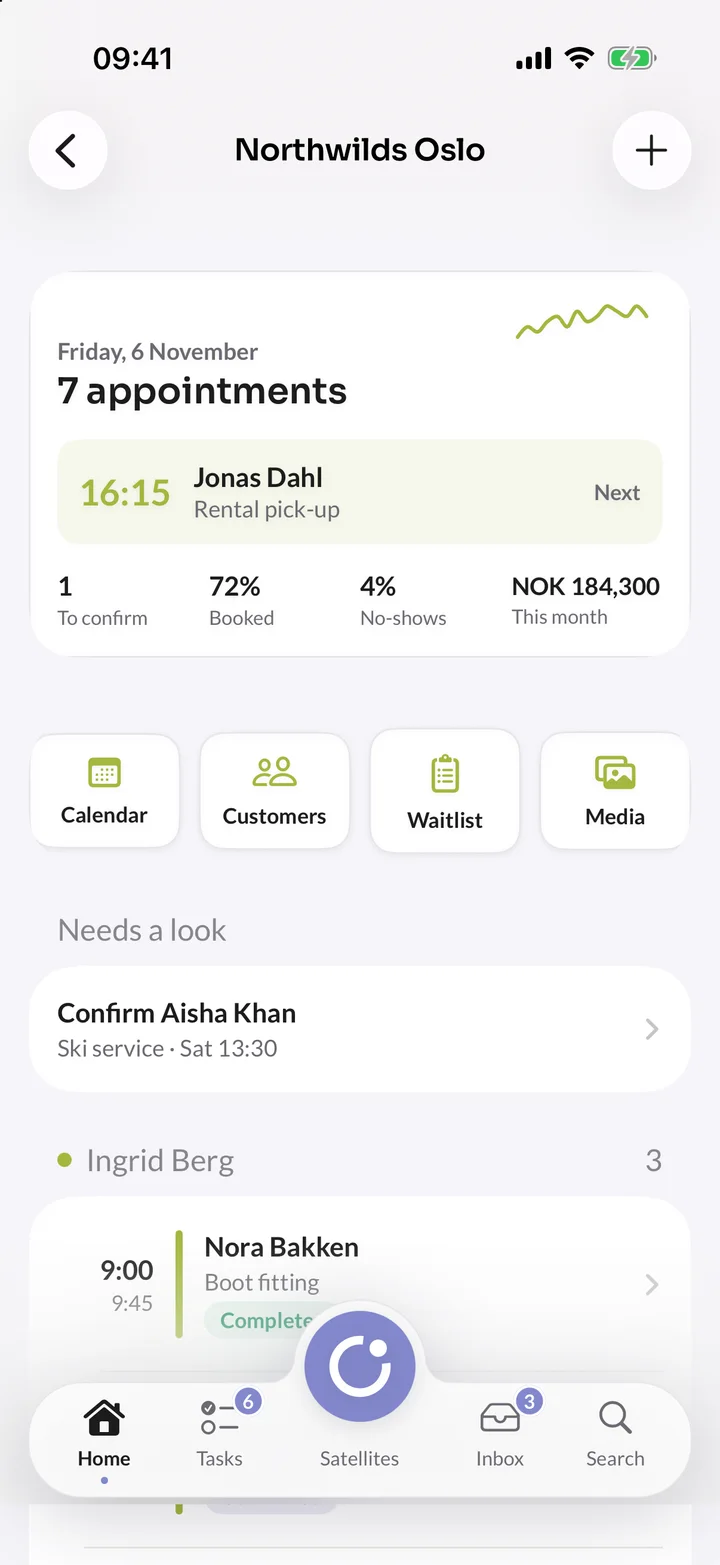
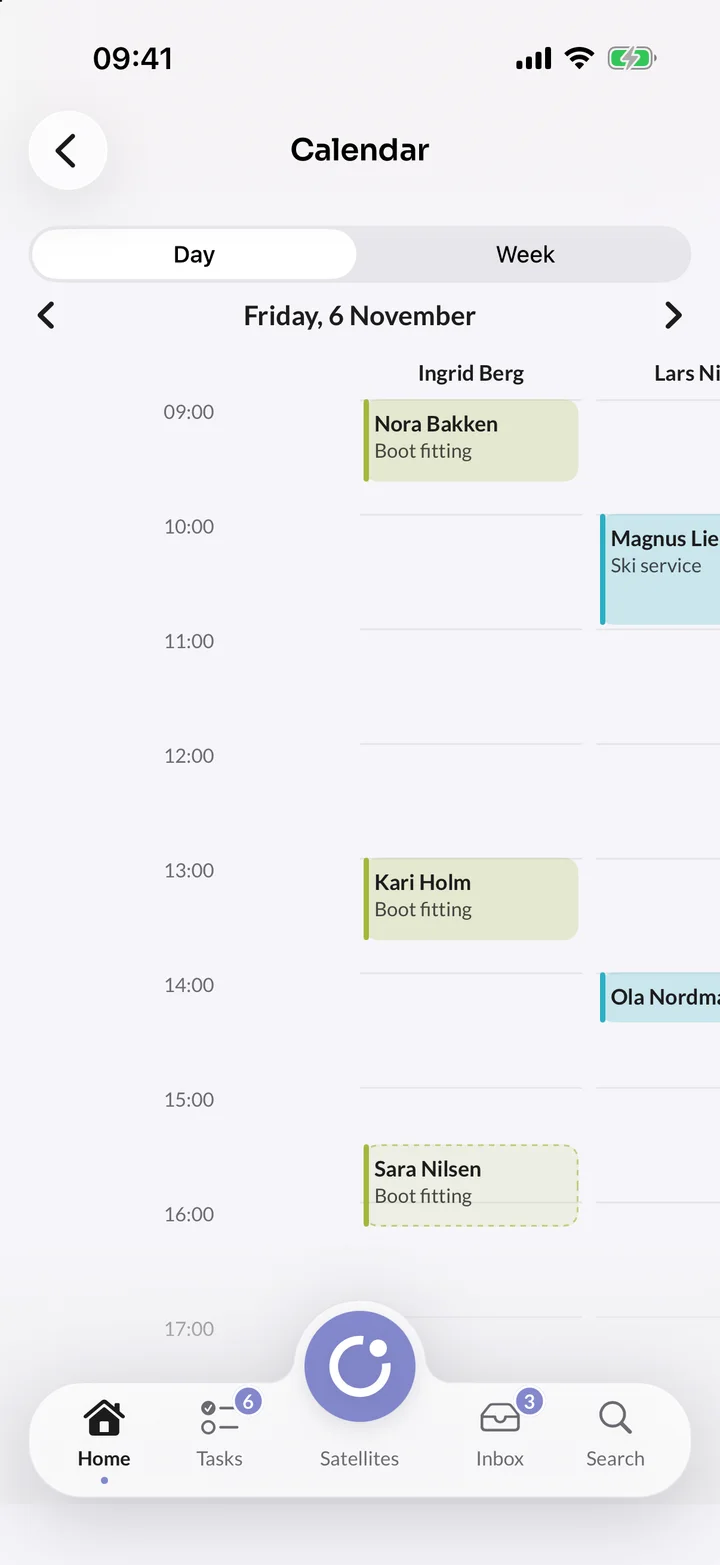
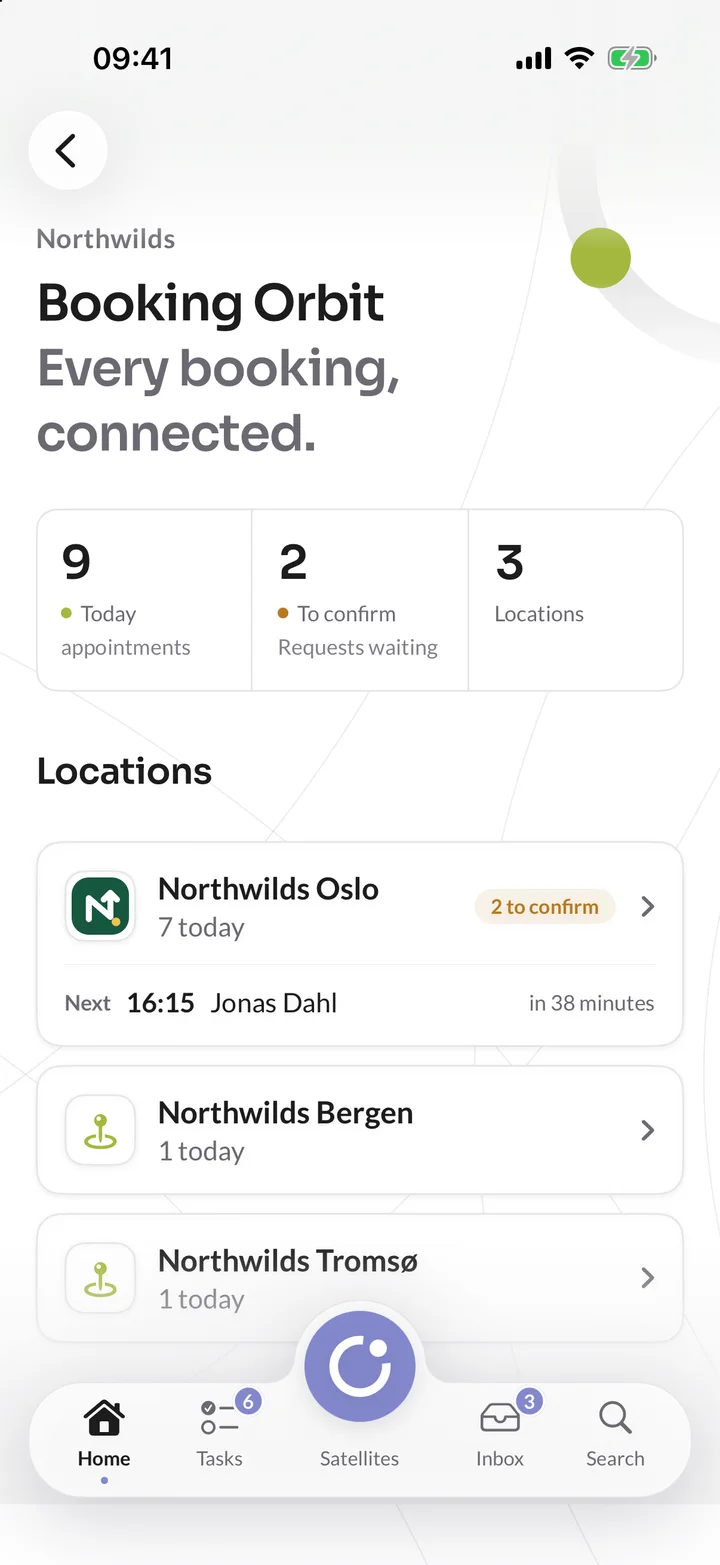
On your iPhone

Today's appointments, wherever you are

See each location's day and who is next. Confirm, check in, move or cancel an appointment, and open the calendar by person.

It's part of the Orbit app, which is being tested and isn't in the App Store yet.

In orbit

Every appointment, shared without personal details

Booking Orbit sends each appointment as an event through Orbit Exchange: booked, moved, cancelled, done or no-show. Names, email addresses and phone numbers stay in Booking Orbit, and other satellites ask for them only when they need them.

  • CMS OrbitBoth ways

    Book on your own pages

    Services, Book an appointment, Next available times and Meet the team components take bookings on a website built with CMS Orbit, with prices and free times always current.

  • A review request after each visit

    Presence Orbit asks each customer for a review once their appointment is marked as done. Cancelled appointments and no-shows are never asked.

  • Bookings as goals

    Every booking counts as an Appointment booked event, with its price as revenue, so it can be a goal on your website.

  • Book a fitting from a product

    Put a service's booking link on a product in Commerce Orbit, such as a Book a fitting button on hiking boots.

  • Travel OrbitReceives

    Advice before the trip

    Add the booking link for a trip adviser call or a gear check to Travel Orbit's booking confirmation.

  • Interviews in your own diary

    Use an interview service's booking link in Careers Orbit's interview invitations.

Everything included

Everything in Booking Orbit

Every part of Booking Orbit, from the first free time on the booking page to the report at the end of the month.

97 features in 10 areas. A tag shows the plan a feature starts in; everything else is in every plan.

Locations and services

  • Locations at a place or online only
  • Each location with its own team, page and Stripe
  • Services with a length, a price and a description
  • Free time kept before and after a service
  • Prices that are free, fixed, from or on request
  • Anyone available: take turns, least busy or in order
  • Listed, link only or team only
  • Copy a service, or move it to the bin
  • Group sessions with a set number of placesGrowth
  • Rooms and equipment a service needsGrowth

Reminders and no-shows

  • Confirmation, moved, cancelled and thank you emails
  • Up to four reminders, with quiet hours
  • Reminder times of its own for any service
  • Time to book again, for services people repeat
  • Reminders by text message through your own TwilioGrowth
  • Reminders on WhatsApp with approved templatesGrowth
  • Email templates in every language you use
  • Send from your own domain
  • Latest messages, with whether each one arrived
  • No-show risk from 0 to 100, with its reasons
  • An extra reminder in one click

Reports

  • Utilisation, revenue, no-shows and cancellations
  • Booked ahead, book again and returning customers
  • Revenue by service and by person
  • Utilisation by person
  • Where bookings come from
  • Busy hours by day and hour
  • Every appointment as a CSV file

AI

  • Booking assistant on Today and the booking page
  • Short requests understood without an AI key
  • Any wording and language with your own AI keyGrowth
  • Smart times that keep the day tidy
  • Nothing changes until a person chooses
  • Customers' details never go to the AI provider
  • An MCP server for Claude and other assistants

Staff and availability

  • Staff with a photo, title and short bio
  • Opening hours in the location's time zone
  • Each person's own working hours, with split days
  • Time off, blocked times and extra hours
  • Notice, furthest ahead and start times
  • Deadlines for customers to move or cancel
  • A limit on bookings per customer per day
  • Approve each booking before it's confirmed
  • Rules of its own for any service
  • Stop someone taking bookings while away

Today and the calendar

  • The day in a sentence, with appointments by person
  • What needs you: to confirm, to mark and waiting
  • Calendar by staff, day, week, room or list
  • Book for a caller from an empty time
  • Drag to move or to change the length
  • Move appointments with the keyboard too
  • Check in, done, no-show or cancel with a reason
  • A history and team notes on every appointment
  • Find an appointment by name, phone or reference
  • Orbit app for iPhone, not in the App Store yet

Connections and team

  • Booking components on websites built with CMS Orbit
  • Review requests through Presence Orbit after each visit
  • Bookings as goals in Insights Orbit
  • Booking links for Commerce, Careers and Travel Orbit
  • Events through Orbit Exchange, without personal details
  • A public booking API for any website
  • Viewer, Editor and Admin roles
  • Choose which locations each person opens
  • 15 interface languages, chosen by each person in Orbit
  • An audit trail of changes to settings
  • A media library and a bin
  • Uploads kept in your own S3-compatible bucket
  • Files from Cloudinary, Bynder and FrontifyGrowth

Booking page

  • Four short steps: service, person, time, details
  • No account needed to book
  • Times in the customer's own time zone
  • The time held while they finish
  • In every language the location writes in
  • Works with a keyboard and screen reader
  • Forms with eight kinds of question
  • Consent kept with its exact wording
  • Sensitive answers encrypted and hidden from Viewers
  • Change or cancel online from the confirmation
  • Add to Apple, Google or Outlook calendars
  • A waitlist that holds a freed time for two hours
  • A link, a QR code or a widget on your website
  • A page of its own for every service

Payments

  • Payments into each location's own Stripe account
  • Free, a deposit, paid in full or a card saved
  • Deposits as a fixed amount or a share
  • No-show and late cancellation fees on the saved card
  • Refunds worked out from your cancellation rules
  • Refund any payment by hand
  • Packages of sessions, with an expiry if you like
  • Money in, refunds, deposits held and no-show fees

Customers

  • One record per customer, by email or phone
  • Visits, no-shows, notes and tags together
  • Search by name, email or phone, and filter by tag
  • Merge duplicates
  • Export a customer's data on request
  • Erase a customer, with reports still adding up
  • An unticked box for news and offers

Plans

Booking Orbit's plans

Every plan starts with a free 14-day trial, with no card, and includes the booking page, email reminders and payments through your own Stripe account. Orbit itself, with sign-in, people and Orbit Exchange, is free for every organisation.

Prices in euros, excluding VAT.

  • Starter

    For one place taking appointments, with reminders by email and calendar sync.

    €16/ monthbilled yearly at €192, after a free trial

  • Recommended

    Growth

    For a growing team across a few locations, with text and WhatsApp reminders, rooms and classes.

    €66/ monthbilled yearly at €792, after a free trial

  • Enterprise

    For larger organisations with their own requirements.

    From€390per month, with a yearly agreement

    Talk to us

Every plan includes

  • 14-day free trial, no card
  • Hosted in the EU
  • A full audit trail
  • 15 interface languages
  • Export your content any time
  • Files in your own bucket
  • A person answers support

The free trial lasts 14 days and includes everything in the plan you choose. Nothing is deleted when it ends: an owner chooses a plan under Billing in Orbit and you carry on.

Questions

Before you choose Booking Orbit

How do customers pay in Booking Orbit?

Through your location's own Stripe account: a deposit, the full price up front, or a saved card for late cancellations and no-shows. Money goes straight to you, refunds follow your rules, and Bifröst Orbit takes no cut.

Can customers book on our own website?

Yes. A website built with CMS Orbit takes bookings with its own components, with services, free times and the team kept current. Any other website can add the booking widget, a link or a QR code, and developers can use the public booking API.

How does Booking Orbit reduce no-shows?

Reminders go out at the times you choose, with a link to change or cancel, so a time someone can't use goes back on offer and to the waitlist. Each upcoming appointment has a no-show risk with its reasons, and you can send an extra reminder or ask for a deposit or a saved card for a no-show fee.

Does Booking Orbit work with our Google or Microsoft calendars?

It's built to: each person can connect Google or Microsoft 365 calendars, so busy times block bookings and appointments appear where they already look, with Meet, Teams or Zoom links for online services. These connections switch on once Bifröst Orbit's connections with Google, Microsoft and Zoom are approved. Until then, customers add their appointment to Apple, Google or Outlook calendars from the confirmation.

What does the booking assistant do?

It finds a time from a request in plain words, such as 'A boot fitting next Tuesday after work', for your team and for customers on the booking page. On Growth, with your own AI key, it understands any wording and language. Customers' details are never sent to the AI provider.

Where is my data stored?

In the EU. The platform runs in a data centre in Spain, with a recovery copy of the database and its backups in France, and files are stored and email is sent in Ireland. Our website and docs are also served from a server in the United Kingdom, which keeps no personal data. Our network provider may route traffic outside the EU under standard safeguards. The list of sub-processors names every provider.

Where do we get help?

Every feature is documented at docs.bifrostorbit.com, with step-by-step guides for editors and developers, full API references and a guide for AI agents. You can also ask our team in the chat on every page, and a person answers.

Open your diary to the world.

Add a location, its people and services, and share your booking page today. The trial is free for 14 days.

Book a demo

From the blog

Read more about Booking Orbit

All posts
Comparisons

8 min read

Booking Orbit vs Calendly and SimplyBook.me

Calendly books meetings and SimplyBook.me books almost anything. Booking Orbit books appointments at locations, with deposits, no-show fees and free SSO on its first plan.