Skip to content
Bifröst OrbitInsights Orbit
Sign in

Insights Orbit

See beyond the numbers. Answers your whole team can read.

Insights Orbit shows how people use your websites and apps, counted without cookies.

Plain sentences and clear charts say how many came, where from, which pages worked and whether they did what you wanted. Your data stays in the EU, and you hear when something needs a look.

See plans

Why teams switch

Analytics that answer, rather than report

Most teams open their analytics to answer one question, and leave with ten tabs and a doubt. Here is the same week, two ways.

  • Consent

    Today

    A cookie banner in front of every page, and the visitors who decline are missing from every report.

    With Insights Orbit

    No cookies and nothing stored in the browser, so the script counts without a cookie banner of its own. The help explains our view and where the law is still open.

  • Monday's question

    Today

    Someone builds a report to find out how last week went, then explains what the terms mean.

    With Insights Orbit

    Last week in a few words: how many came, where most came from, the page seen by the most people and how your goals did.

  • A broken form

    Today

    Found days later, when someone asks why the enquiries stopped.

    With Insights Orbit

    An alert in the Orbit bell when a goal that was completed every day stops being completed.

  • What counts

    Today

    A tracking plan and a release for every new button you want to count.

    With Insights Orbit

    Goals on any page or event, and on Growth, label a button on your live website with no code.

  • The website itself

    Today

    Numbers live in one tool and the pages in another, so nobody connects a drop to a change.

    With Insights Orbit

    Each page's numbers in the CMS Orbit editor, and every publish marked on the charts.

The overview

One screen, one question at a time

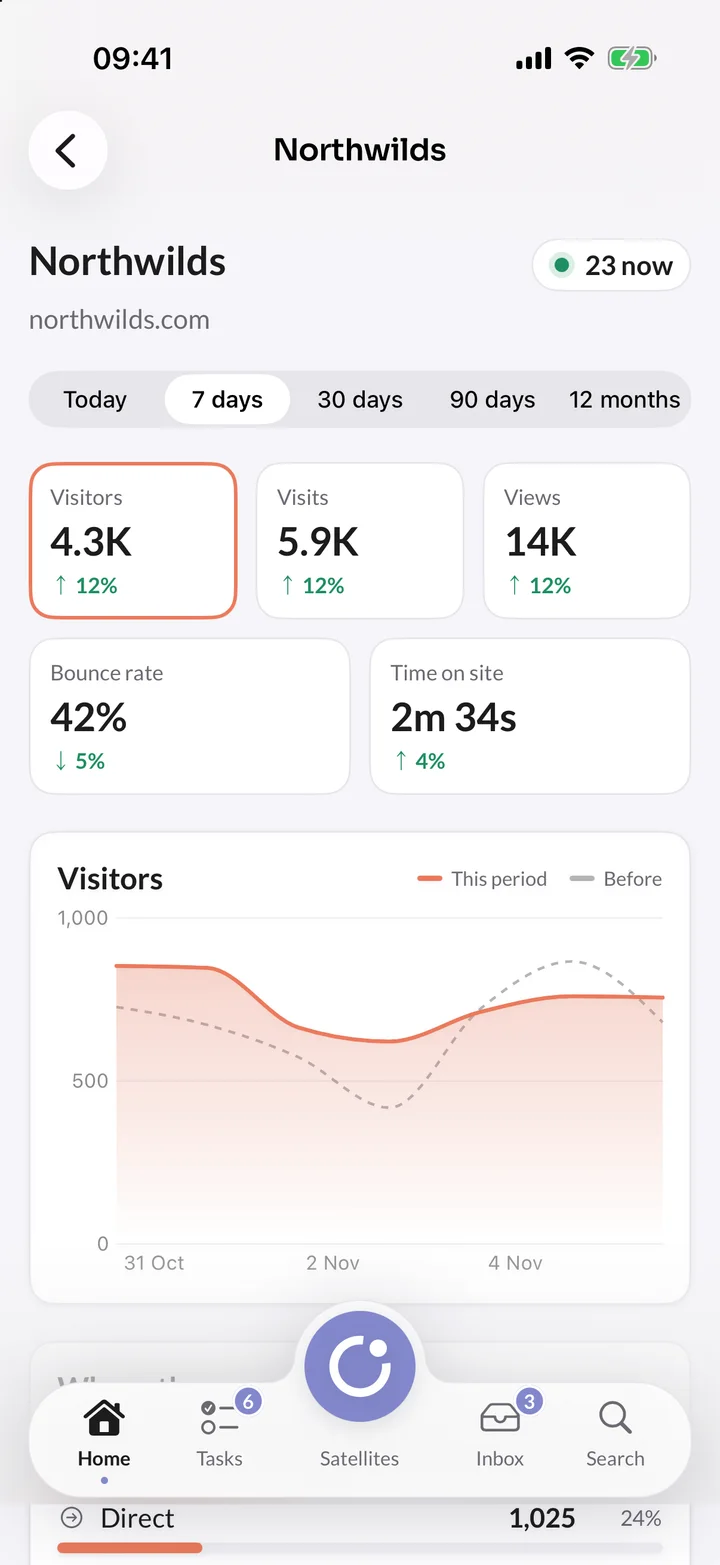
Each part of the overview answers one question in a sentence, with a chart or a list: where they came from, which pages worked, when people visit and whether they did what you wanted. Select a source, page or country anywhere and the whole report follows, with the filter in the address so you can send it to a colleague.

  • Compare: The period before sits behind every chart, and today is compared with yesterday up to the same hour.
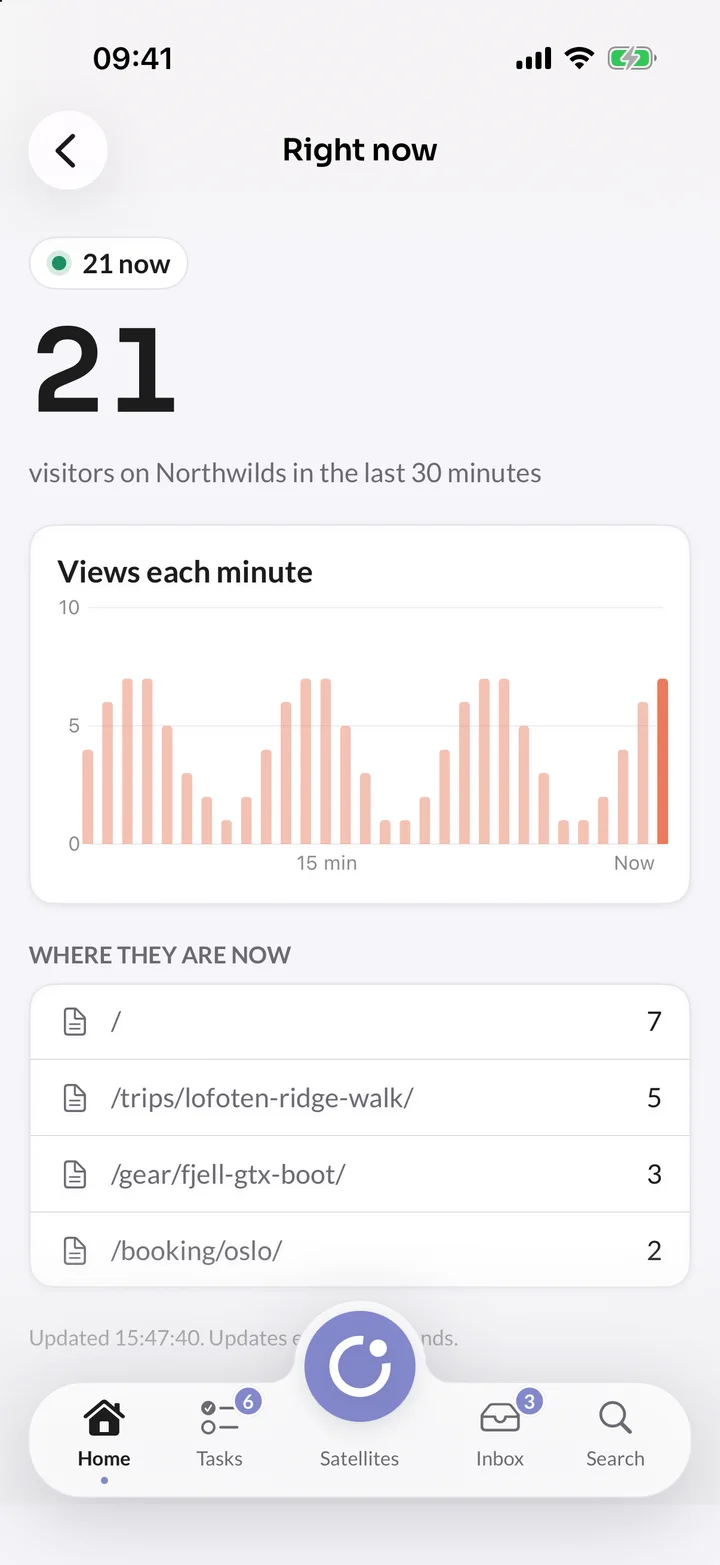
  • Right now: Who is on the site in the last 30 minutes, and which page each person is on.
  • Nothing hidden: Bots, browsers that ask not to be tracked and your own team are left out on purpose, and the overview says how many.
Insights OrbitOverview

Who it's for

For everyone who asks how the website is doing

Marketing teams

See which campaign, newsletter or source brought visits that did something, with the revenue where there is a price.

Editors

See each page's visitors and goals next to the page itself in CMS Orbit, and which pages nobody reads.

Developers

One script of about 2 KB, events with one line of code, a server API and a raw event API.

Owners and boards

A weekly summary by email with a PDF, or a read-only dashboard link with a password and an end date.

How it works

From switch to first answer

  1. 01

    Add your site

    Add a website or app and list the addresses it lives on, such as northwilds.com. Your plan sets how many you can add.

  2. 02

    Start counting

    Switch it on in your CMS Orbit space, or add one line of script to any other website. It counts page views, outbound links, downloads, forms, scroll depth and missing pages on its own.

  3. 03

    Say what counts

    Add goals, such as a visit to the thank-you page or a Booking paid event, with a value if you like.

  4. 04

    Get told

    Every new site gets two suggested alerts for its Admins, and the overview fills in as visits arrive.

Goals and revenue

Say what success looks like, and see what brought it

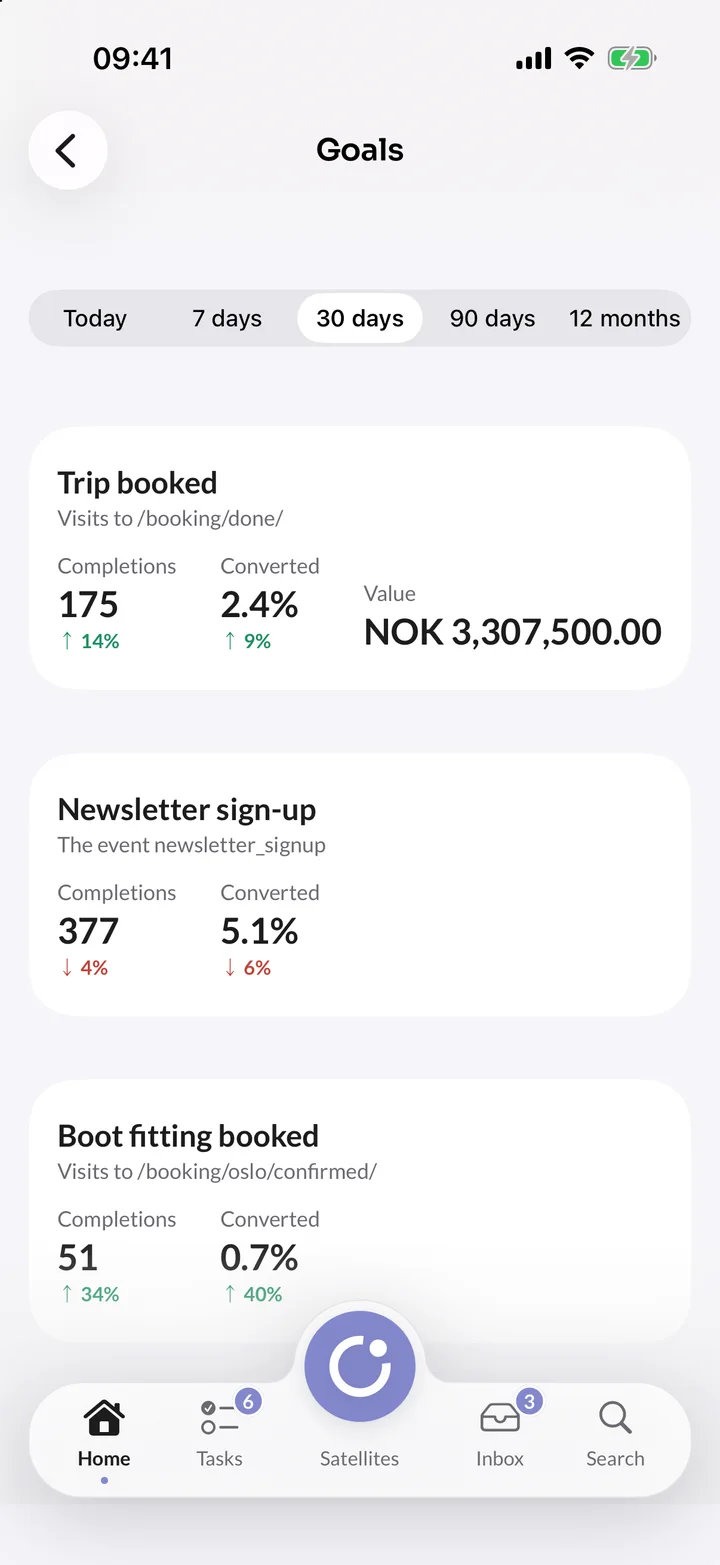
A goal is a page reached or an event sent, such as Booking paid. Insights Orbit shows how many visits got there, the share of all visits that did, and which sources and entry pages brought them. Goals look back, so a new goal shows completions from before you added it.

Insights OrbitGoals
  • Revenue on goals: On Growth, give a goal a fixed value or add up the revenue your website sends, per currency and never converted.
  • Funnels and journeys: On Growth, two to eight steps in order, with the drop-off at each step and the common paths between pages.
  • Labelled events: On Growth, click a button on your live website and name it, with no code and no release.
  • Search Console: On Growth, connect your own Google account to see the searches each page is found for.

At Northwilds

How an outdoor travel brand uses it

Northwilds sells guided trips, such as a Lofoten ski touring week, on northwilds.com. These are the questions it answers with Insights Orbit.

Northwilds, bookings

Where Lofoten bookings are lost

The booking form on northwilds.com sends an event at each step. A funnel shows how many visits went from one step to the next, and where they stopped.

  1. Trip search
  2. Booking started
  3. Traveller details added
  4. Payment reached
  5. Booking paid

The step with the biggest drop is the one to fix first.
Northwilds, marketing

Did the spring newsletter sell trips?

Links in the newsletter carry utm tags, such as utm_campaign=spring, so its visits show under Campaigns. The Booking paid goal adds up the revenue each source brought in.

  1. Tag the newsletter's links
  2. Filter the overview by the campaign
  3. Compare its goal value with search

A smaller source that converts better is easy to spot.

Northwilds, website team

A broken enquiry form, caught the same day

The Trip enquiry goal is completed every day. If it stops for 24 hours, the suggested alert puts a notification in the Orbit bell of every Admin, with a link to the site.

Fixed the same day, not after a week of missing enquiries.

See what your website really does

Add the script to your website and follow visits, goals and campaigns from the first day. Or try it yourself in a live demo of Northwilds, yours for 7 days.

Told, not searched for

It brings the news to you

Nobody has to remember to look. Insights Orbit says what changed and what needs attention, from the numbers alone.

Last week in a few words

A few plain sentences about the week on the overview. When AI writes them, it is given only the week's numbers, and the text is kept only when every number in it is one of those.

Worth a look

On Growth, what stands out, most urgent first: a goal that stopped, a page that lost search visits or a busy page after which nobody completed a goal.

Alerts

On every plan, a notification in the Orbit bell when visits fall or rise sharply against the same weekday, or a goal stops being completed.

Summary emails

Weekly or monthly, with six key numbers, a chart, the top pages and sources, and a PDF to forward.

Shared dashboards

A read-only link for an agency or a board, with an optional password and end date. Stop sharing at any time.

On your phone

The Orbit app for iPhone shows each site's overview, sources, goals and who is on the site right now. The app comes to the App Store soon.

Inside CMS Orbit

The numbers next to the work

Switch Insights Orbit on in a CMS Orbit space and its website is counted, with no script to copy for websites built with the SDK. Each page keeps its history when its address changes.

  • In the page editor: Visitors, sources, scroll depth and goals for the last 30 days, with the trend.
  • Publishes on the charts: Each day a page, campaign or release went live is marked, so a change in visits sits next to a change on the website.
  • Experiments: When an editor tests a component or a page, Insights Orbit shows what else each variant changed: where visitors went next, how long they stayed and which goals they reached. The winner is chosen in CMS Orbit, and a person approves it.

AI assistants

Ask your assistant. It reads your numbers.

On Growth and Enterprise, connect Claude, ChatGPT or any assistant that supports MCP. It answers with your organisation's own visitors, sources, goals and funnels, with your access, for as long as you have Insights Orbit.

  • Only reads: it can't add or change sites, goals or settings
  • Never sees a single visitor or a known user
  • Works with the access of the person who connected it
  • Disconnect it at any time, and it stops at once

How did the spring newsletter do against search last month?

The spring newsletter brought fewer visits than search, but a larger share of them reached Booking paid. The numbers come from Insights Orbit; check them before you share them.

Drafted by AI · waiting for review

Privacy

Counted without cookies, kept in the EU

No cookies, nothing stored in your visitors' browsers and no personal data kept. The help explains why we think anonymous counting needs no consent banner, and where the law is still open, so you can check it with your own advisers.

We run the service with a few trusted providers, named in our list of sub-processors.

No cookies

No cookies, and nothing kept in the visitor's browser unless they ask not to be counted.

A new secret every day

A visitor is recognised for one day only, with a secret that is replaced every night. Nobody can be followed from one day to the next.

No IP addresses kept

An address is used for a moment to find the country and device, then dropped. It's never written down.

Hosted in the EU

The platform runs in a data centre in Spain. Your visitors' data is never sent to Google or another analytics provider.

Privacy signals respected

Browsers with Do Not Track or Global Privacy Control switched on are not counted at all.

Known users only if you choose

Following signed-in people across days is personal data, so it's off until an admin switches it on, on Enterprise.

On your iPhone

Your numbers at a glance

Visitors right now, each period against the one before, and every goal with its completions, conversion and value, for each of your sites.

It's part of the Orbit app, which is being tested and isn't in the App Store yet.

In orbit

Results from every satellite

Switch each one on for a site under Linked satellites, and what happens in your other satellites counts as an event you can make a goal, with revenue where there is a price.

  • CMS OrbitBoth ways

    Websites and their pages

    Follow a CMS Orbit website in one click. Each page shows its numbers in the editor, and publishes are marked on the charts.

  • Order placed

    Every order as an event, with its total as revenue.

  • Appointment booked

    Every booking as an event, with its price as revenue.

  • Review received

    Every new review as an event, with its rating.

  • Applied

    Visits to your career pages, and each application as an event.

Everything included

Everything in Insights Orbit

Every feature in Insights Orbit, from the first visit counted to the data in your own tools, with the plan each one starts in.

79 features in 9 areas. A tag shows the plan a feature starts in; everything else is in every plan.

Traffic and pages

  • Visitors, visits, page views, average visit and bounce rate
  • Compare with the period before
  • Periods from today to 12 months, or custom dates
  • Top, entry and exit pages, with time on page
  • Countries on a world map, with their regions
  • Languages, devices, screen sizes, browsers and systems
  • When people visit, by hour and weekday
  • Who is on the site right now
  • Filter any report by a source, page or country
  • Filters and period kept in the link
  • Days in each site's own time zone
  • Any table downloaded as CSV

AI

  • Last week in a few words, checked against the numbers
  • AI assistants over MCP, such as Claude or ChatGPTGrowth
  • Assistants read with your own access, and only read
  • Assistants never see a single visitor or known user
  • Disconnect an assistant at any time

Connections and data

  • A script of about 2 KB, including single-page apps
  • First-party proxy on your own domain
  • One component on websites built with the CMS Orbit SDK
  • Each page's numbers in the CMS Orbit editor
  • SEO score and issues from CMS Orbit beside each page
  • Publishes and releases in CMS Orbit marked on the chart
  • Banner and popup variants compared
  • Events from CMS, Commerce, Presence and Careers Orbit
  • Raw event API, GraphQL and API playgroundGrowth
  • Nightly export to your own S3 bucketEnterprise

Sources and campaigns

  • Search, AI assistants, social, email, paid, referral and direct
  • Paid visits found from ad click ids
  • Referring websites, by name only
  • Campaigns from utm tags
  • Visits from each source per day
  • Google Search Console searches per pageGrowth
  • Whether Google has indexed a page, in CMS Orbit's editorGrowth

Funnels and segments

  • Funnels of two to eight stepsGrowth
  • Where visits stop, and the usual time between stepsGrowth
  • Journeys before and after any page or eventGrowth
  • The most common paths to and from a pageGrowth
  • Saved segments on any report and siteGrowth
  • Known users, followed across days and devicesEnterprise
  • Funnels across days for known usersEnterprise
  • Retention by week or monthEnterprise

Experiments

  • Experiments from CMS Orbit, with visitors per variant
  • Each variant's visits, bounce rate and events
  • The site's goals reached by each variant
  • Any report filtered to one variant
  • Running experiments on the overview
  • Start, pause, end and winner marked on the charts

Events and goals

  • Outbound links, downloads, forms, scroll depth and 404s, without code
  • Your own events with one line of code
  • Event details broken down by value
  • Events from your servers through the server API
  • Goals for a page reached or an event sent
  • Goals that look back over earlier visits
  • Goals by source and entry page
  • Label buttons and links with no codeGrowth
  • Goal values and revenue, per currencyGrowth

Alerts and reports

  • Alerts when visits fall or rise sharply
  • Alerts when a goal stops being completed
  • Two suggested alerts for every new site
  • Weekly or monthly summary emails with a PDF
  • Send a summary now, or a preview to yourself
  • Dashboards with the charts and tables you pin
  • Read-only dashboard links with a password and an end date
  • Overviews on the Orbit app for iPhone
  • Worth a look: what stands out, most urgent firstGrowth

Privacy and control

  • No cookies, and nothing stored in the browser
  • Visitors recognised for one day only
  • IP addresses never stored
  • Do Not Track and Global Privacy Control respected
  • Wait for consent with one attribute
  • Opt-out page and buttons for your privacy notice
  • Leave out your office's addresses and your team's browsers
  • Bots, referrer spam and data centres left out
  • Delete test traffic by address and time
  • Viewer, editor and admin roles
  • 15 interface languages, chosen by each person in Orbit
  • Audit trail and a bin with restore
  • Download or erase one known user's eventsEnterprise

Plans

Insights Orbit's plans

Every plan starts with a free 14-day trial, with no card, and includes alerts, events from other satellites, CSV downloads and the audit trail. Insights Orbit never stops counting when you go over your monthly events.

Prices in euros, excluding VAT.

  • Starter

    For a small team with a website or two.

    €16/ monthbilled yearly at €192, after a free trial

  • Recommended

    Growth

    For teams that follow goals, funnels and campaigns across several sites.

    €66/ monthbilled yearly at €792, after a free trial

  • Enterprise

    For larger organisations with their own requirements.

    From€399per month, with a yearly agreement

    Talk to us

Every plan includes

  • 14-day free trial, no card
  • Hosted in the EU
  • A full audit trail
  • 15 interface languages
  • Export your content any time
  • Files in your own bucket
  • A person answers support

The free trial lasts 14 days and includes everything in the plan you choose. Nothing is deleted when it ends: an owner chooses a plan under Billing in Orbit and you carry on.

Questions

Before you choose Insights Orbit

Do we need a cookie banner for Insights Orbit?

We don't think so for anonymous counting, and most cookieless analytics take the same view. Insights Orbit sets no cookies, stores nothing in the browser unless a visitor opts out, and keeps no personal data. Its script does read the window width and browser language, and German regulators read the ePrivacy rules strictly, so the help sets out the reasoning and the open questions for your own advisers. If you switch on known users, that is personal data, and your privacy notice needs to say so.

Can Insights Orbit replace Google Analytics?

It covers what most teams use Google Analytics for: visitors, sources, pages, events, goals and funnels, in plain words. It has no advertising features, such as audiences for Google Ads. You can run both side by side while you compare.

Do we need CMS Orbit to use Insights Orbit?

No. Insights Orbit counts any website with one line of script. With CMS Orbit, you switch it on in the space settings instead, and each page shows its numbers in the editor.

What about ad blockers?

Some ad blockers block analytics scripts on other domains, so those visitors aren't counted. Serve the script and its events from your own domain through a first-party proxy to lose fewer, and send events that matter, such as a confirmed payment, from your server through the server API.

What happens when we go over our monthly events?

Insights Orbit never stops counting. Owners and admins are told when the organisation has used 80% of the month's events, and again at 100%, so you can move up a plan before you need to.

Where is my data stored?

In the EU. The platform runs in a data centre in Spain, with a recovery copy of the database and its backups in France, and files are stored and email is sent in Ireland. Our website and docs are also served from a server in the United Kingdom, which keeps no personal data. Our network provider may route traffic outside the EU under standard safeguards. The list of sub-processors names every provider.

Where do we get help?

Every feature is documented at docs.bifrostorbit.com, with step-by-step guides for editors and developers, full API references and a guide for AI agents. You can also ask our team in the chat on every page, and a person answers.

See how your pages perform.

Add your website, choose your goals and read the first answers today. The trial is free for 14 days.

Book a demo

From the blog

Read more about Insights Orbit

All posts
Comparisons

9 min read

Insights Orbit vs Google Analytics and Plausible

Google Analytics is free and deep, Plausible is simple and private. Insights Orbit is cookieless too, and adds alerts, plain summaries and numbers inside your CMS from its first plan.